Payment Links

Overview
Merchants needed a faster way to get paid, without a website, without code, without friction. Payment Links made it possible to generate a shareable link, QR code, or payment button in seconds, across email, SMS, and social. Customers pay how they want. Merchants get paid how they need.
Problem
A powerful feature that almost no one could use
The platform already had a payment collection feature, Website Payments, but it came with a steep technical barrier. Implementing it required coding knowledge, API calls, and webhook configuration. For a merchant whose job is running a business, not writing code, this wasn't a realistic option.
Business problem
A complex implementation process and poor discoverability meant adoption was low, and fee processing and transaction reporting were harder to streamline as a result.
Merchant problem
The existing solution was buried five clicks deep and required technical knowledge most merchants didn't have, effectively locking them out of a feature they needed.
Root cause
The feature was built for developers, not merchants. It solved the right problem for entirely the wrong audience.

The use of tokens and API keys were a pain point for most users, resulting in straying away from utilizing this amazing feature to collect payments.

"Do I need to be knowledgable in code to maximize it's use".
What users see in order to create a dynamic link to get paid. It was a painpoint to utilizing what should be an easy way to get paid.
Goals & Success Metrics
Simpler payments. Cleaner operations.
Merchant goal
Collect payments in seconds, via link, QR code, or button, without touching a line of code or navigating a complex UI.
Business goal
Increase payment link adoption, streamline merchant transaction reporting, and reduce friction in fee processing at scale.
Research & Discovery
Stakeholder and user interviews surfaced a consistent pattern: most merchants weren't struggling with the payment feature, they were simply avoiding it entirely. Technical complexity had quietly filtered out the majority of the intended audience.
Merchants weren't failing to use the feature, they were opting out before even trying, deterred by the coding requirements at the front door.
Three core needs emerged clearly: quick setup with no technical overhead, the ability to edit links after creation, and a central place to view and manage all active links.
Navigation depth was a silent killer, five clicks to reach a payments feature in a payments platform was a structural problem, not just a UX inconvenience.

Design Process
From developer tool to merchant-first experience
The design strategy centered on one principle: remove every barrier between a merchant and their first payment link. That meant tackling complexity, discoverability, and control simultaneously. The team worked through wireframes and high-fidelity mockups iteratively before finalizing the flow.
Removed the technical barrier entirely
Eliminated coding requirements, API calls, and webhook configuration. Link creation became a guided, form-based flow any merchant could complete in under a minute.
Elevated the feature's placement in the UI
Relocated Payment Links to a prominent, top-level position in the navigation, reducing access from five clicks to one or two, and making it feel like a first-class feature rather than a buried setting.
Built in editability and link management
Merchants can modify, enable, and disable links at any time, preventing stale or outdated payment links from causing failed transactions or guest confusi
Explored expanded functionality
Investigated recurring payment support and click-vs-revenue analytics to give merchants deeper insight into link performance, informing future roadmap priorities.

The Solution
A payment link in seconds, shareable anywhere
Payment Links lets merchants generate a shareable link, QR code, or embeddable payment button without writing a single line of code. The feature lives at the top level of the platform UI, surfaces all active links in one place, and gives merchants full control to edit or deactivate at any time.
At launch, a Pendo-guided walkthrough was introduced in-app to orient new users, reducing the support burden and accelerating time-to-first-payment for merchants encountering the feature for the first time.
Results & Impact
400+ merchants onboarded in two weeks
Payment Links lets merchants generate a shareable link, QR code, or embeddable payment button without writing a single line of code. The feature lives at the top level of the platform UI, surfaces all active links in one place, and gives merchants full control to edit or deactivate at any time.
At launch, a Pendo-guided walkthrough was introduced in-app to orient new users, reducing the support burden and accelerating time-to-first-payment for merchants encountering the feature for the first time.
400+
Merchants onboarded in the first two weeks post-GA
5→2
Clicks to access the feature, reduced from five to one or two
0
Lines of code required to create a payment link
Merchants described the new experience as faster, simpler, and more accessible than the previous solution, a direct validation of the core design goals.
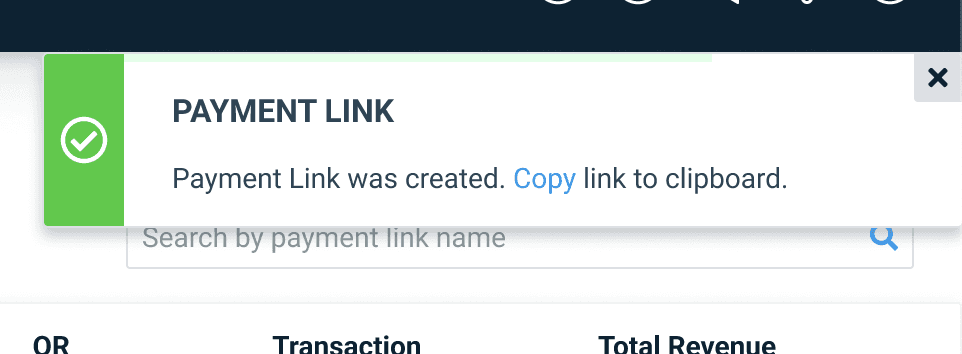
The Pendo guided walkthrough drove adoption and user confidence at launch, reducing friction for merchants encountering the feature for the first time.




Reflection
Three things this project reinforced
Visibility drives engagement
Moving the feature out of the depths of the UI and into a prominent location was as impactful as the feature itself. Discoverability is a design problem, not just a marketing one.
Simplicity expands your audience
Removing the coding requirement didn't just improve the experience, it fundamentally changed who could use the product. Reducing friction is a growth strategy.
Education is part of the design
The Pendo guided walkthrough wasn't an afterthought, it was a deliberate part of the launch experience. Good design includes the moment a user encounters a feature for the first time.
© Joshua Miller 2025